.png?width=200&height=50&name=cydarm%202024%20logo%20blue%20on%20transparent%201000x250%20(3).png)
Overview
Cydarm is configured with a standard, best-practice incident response lifecycle. This default workflow is closely aligned with international security standard like NIST SP 800-61, keeping the phases clean and structured.
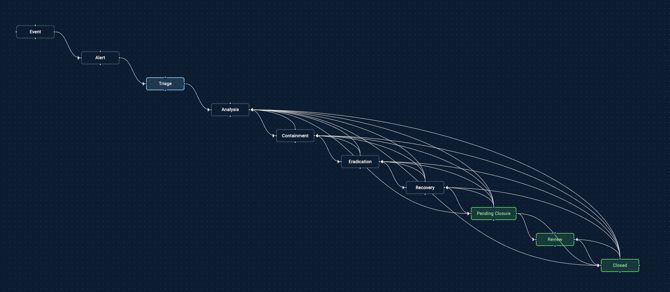
Incident lifecycle
Upon an alert or event triggering, the default Cydarm incident lifecycle guides the team through the following progressive stages:
1. Triage
- What happens here: A new alert or case has just landed in the platform. The primary goal of this stage is rapid initial assessment—determining whether the event is a true positive, assessing its initial impact, and deciding if it warrants a full investigation.
- Key Metric: This stage usually has a tight Service Level Objective (SLO) countdown timer (e.g., Triage must be completed under 10 or 15 minutes) to ensure critical alerts aren't missed.
2. Analysis
- What happens here: Once verified as a real issue, the case moves into deep investigation. Analysts collect evidence, gather threat intelligence, pivot on Indicators of Compromise (IOCs), and map out the full scope of the malicious activity or system exposure.
3. Containment
- What happens here: Immediate tactical actions are taken to stop the bleeding and prevent the threat from spreading further into the network. This includes actions like isolating affected virtual machines, blocking malicious IPs at the firewall, or disabling compromised user accounts.
4. Eradication
- What happens here: After the threat is safely contained, the team works to completely remove the root cause of the incident from the environment. This involves deleting malware, removing web shells, closing security vulnerabilities, and ensuring the attacker no longer has a foothold.
5. Recovery
- What happens here: Systems are safely restored back to normal business operations. This stage includes restoring data from clean backups, rebuilding compromised systems, changing passwords, and monitoring the environment closely to ensure the threat does not immediately return.
6. Pending Closure
- What happens here: All active containment, eradication, and system recovery tasks have been successfully completed. The case is held in this temporary holding state while administrative wrap-ups are finalized, such as completing the incident report, gathering final approvals from leadership or legal, and ensuring all documentation is fully logged.
- Key Metric: This stage serves as a final quality-assurance checkpoint. It keeps the case visible to managers as "nearly done" without letting it clutter the active, high-priority operational pipeline while the paperwork is being signed off.
7. Closed
- What happens here: The case is officially resolved and finalized. It is moved out of the active operational pipeline and into the historical record for long-term reporting, metrics tracking, and compliance auditing.
Built-in guard-rails
In newer versions of the platform, the transition between these default stages can be enforced with automatic guardrails configured on install:
- Assignee Enforcement: The platform can block a case from moving to the next stage until an owner is explicitly assigned.
- Tag Rules: It can require specific mandatory metadata and tags (e.g., classifying the attack type like phishing or malware alert) before a user is allowed to transition the case out of the active investigation phases.
- For more information of customising your workflow rules please refer to the article Case workflow rules.