.png?width=200&height=50&name=cydarm%202024%20logo%20blue%20on%20transparent%201000x250%20(3).png)
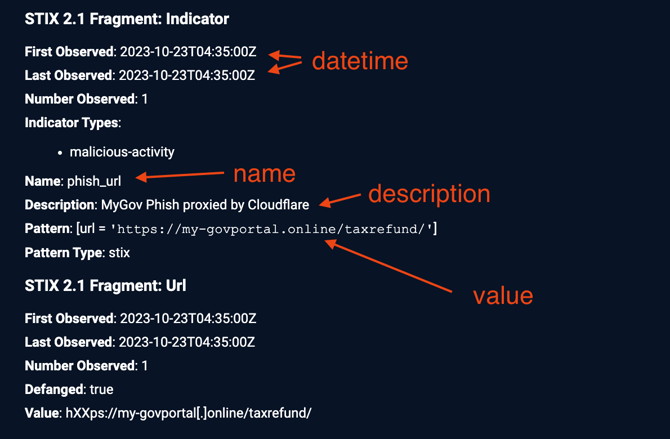
If you would like to add multiple IOCs to a Cydarm case, you can utilize the Bulk IOC Upload feature to perform this by uploading a CSV file containing the IOCs. Once uploaded, the IOCs are stored within Cydarm in STIX 2.1 fragments.
It is recommended upload no more than 100 IOCs at a time.
CSV File Requirements
Ensure the following columns are included in the CSV file:
-
type: Corresponds to STIX observable types. See Indicator Type Mappings below.
-
value: The value associated with the type.
-
datetime: The observation timestamp, which will be used to set "First Observed" and "Last Observed" STIX properties. Needs to be ISO8601 UTC time. Eg 2023-11-10T02:24:48Z
The following columns can optionally be included:
- name: maps to the STIX name property in the Indicator fragment.
- description: maps to the STIX description property in the Indicator fragment.
Note on defanged indicators:
- Defanged URLs using the scheme hXXps://example[.]com/uri/path/ will be handled correctly, but other defanging elements will not be handled correctly (eg hxxps[:]example[.]com will not be handled correctly).
- Defanged IP addresses in the form 1[.]3[.]3[.]7 or 1.2.3[.]4 will be handled correctly.
- Other indicator types should not be defanged.
Indicator Type Mappings
The following is a list of the default acceptable indicator types, and the STIX Domain Objects type they map to, to be used in the CSV column 'type'.
|
Type |
STIX Pattern Type |
|---|---|
|
domain-name |
domain-name:value |
|
ipv4-addr |
ipv4-addr:value |
|
autonomous-system |
autonomous-system:name |
|
directory |
directory:path |
|
url |
url:value |
|
windows-registry-key |
windows-registry-key:key |
|
email-addr |
email-address:value |
|
email-subject |
email-message:subject |
|
file |
file:name |
|
file.sha-256 |
file:hashes.'SHA-256' |
|
file.md5 |
file:hashes.'MD5' |
|
file.sha1 |
file:hashes.'SHA-1' |
|
file.sha-512 |
file:hashes.'SHA-512' |
|
file.sha2-256 |
file:hashes.'SHA2-256' |
|
mac-addr |
mac-addr:value |
|
ipv6-addr |
ipv6-addr:value |
|
artifact |
artifact:payload_bin |
Uploading bulk IOCs
-
From the Case view, click Add Item (1) and select on the Data tab (2) (or type '2' to use the keyboard shortcut to go straight to the Data tab)
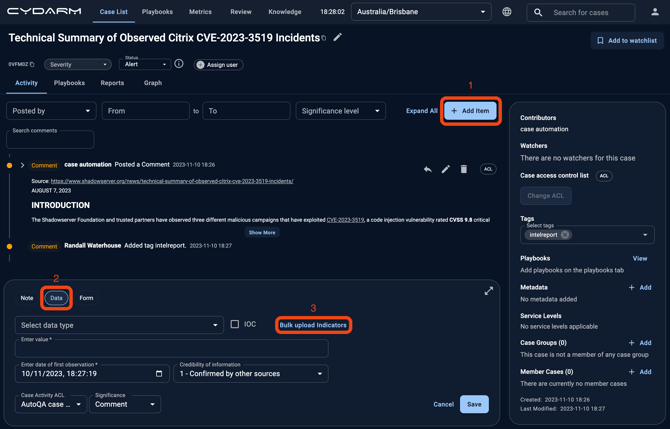
- Click the Bulk upload indicators (3) button to launch the CSV upload modal.
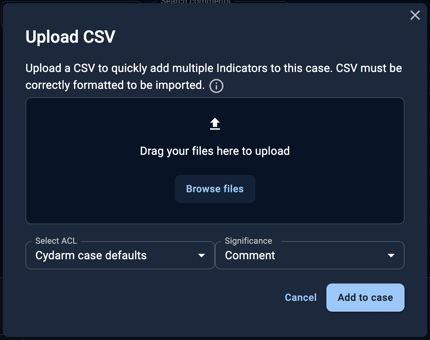
Either drag and drop a file to upload, or Browse files to select a file.
Post-Upload
The system performs the following:
-
Validates the CSV structure.
-
Maps CSV columns to STIX types using system properties (see Advanced configuration below for more information).
-
Generates STIX 2.1 indicators and observables.
-
Displays the results in the activity tab.
Advanced configuration
The following private system properties relate to the bulk IOC upload:
-
BULK_IOC_INDICATOR_PATTERNS: Maps indicator types to STIX types.
-
BULK_IOC_KNOWN_COLUMNS: Configures required and optional columns in the CSV file.
If you frequently import IOCs from another source (eg intel service or TIP) that uses a different column or indicator type naming scheme, it is possible to modify these system properties to match.
For example, if your TIP exports CSV indicator lists and uses 'email-subj' for email subjects, and 'timestamp' for the column heading holding the observed timestamp, you could:
- Modify BULK_IOC_INDICATOR_PATTERNS to change 'email-subject' to 'email-subj', and
- Modify BULK_IOC_KNOWN_COLUMNS to change 'datetime' to 'timestamp'.
Default configurations
Below are the default values for the system properties, in case you need to restore them.
Note that these system properties are "Admin Only", which means only administrator users can view them.
BULK_IOC_INDICATOR_PATTERNS
{
  "domain-name": "domain-name:value",
  "ipv4-addr": "ipv4-addr:value",
  "autonomous-system": "autonomous-system:name",
  "directory": "directory:path",
  "url": "url:value",
  "windows-registry-key": "windows-registry-key:key",
  "email-addr": "email-address:value",
  "email-subject": "email-message:subject",
  "file": "file:name",
  "file.sha-256": "file:hashes.SHA-256",
  "file.md5": "file:hashes.MD5",
  "file.sha1": "file:hashes.SHA-1",
  "file.sha-512": "file:hashes.SHA-512",
  "file.sha2-256": "file:hashes.SHA3-256",
  "mac-addr": "mac-addr:value",
  "ipv6-addr": "ipv6-addr:value",
  "artifact": "artifact:payload_bin"
}
BULK_IOC_KNOWN_COLUMNS
[
  {
  "name": "type", "required": true
  },
  {
  "name": "value", "required": true
  },
  {
  "name": "datetime", "required": true
  },
  {
  "name": "name", "required": false
  },
  {
  "name": "description", "required": false
  },
  {
  "name": "originator", "required": false
  },
  {
  "name": "reference", "required": false
  },
  {
  "name": "ioc", "required": false
  }
]
(note - originator and reference columns are not currently used)
Troubleshooting
If the CSV file is not valid, then the upload will fail with a generic error. Possible causes:
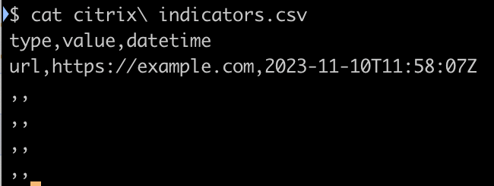
- The timestamp may not be in the correct format. It must be ISO8601 UTC time. For example, 2023-11-10T11:58:07Z, which can be generated using the command:
$ date -u '+%Y-%m-%dT%H:%M:%SZ' - There may be empty CSV rows. Delete these using a text editor
- The related system properties may be malformed or may require fields that are not present. Check that the system properties are valid JSON structures. If in doubt, revert to the default values displayed above.
- There may be too many indicators. If processing the uploaded indicators takes more than 60 seconds, the HTTP connection will time out and the upload will fail. Try again with a smaller number of indicators. It is recommended to upload a maximum of 100 indicators at a time.
- Headings and values in the 'type' column are case sensitive. If the first letter has been capitalised (eg by auto-capitalisation in your spreadsheet application) then this will cause the value to not be recognised. Extra space characters after the value will also cause the value to be considered invalid